Build a landing page with the widget
Ada runs the website for Lumen, a small payments startup. She wants visitors to swap tokens across chains, cash out to their bank, or buy crypto with a bank transfer, right from the homepage. She doesn't want a build step, a framework, or a backend.
In this tutorial you'll build Ada's page from an empty folder. By the end you'll have a landing page with RecoilPay's widget in the hero, three example sentences, and a panel that shows every event the widget sends.
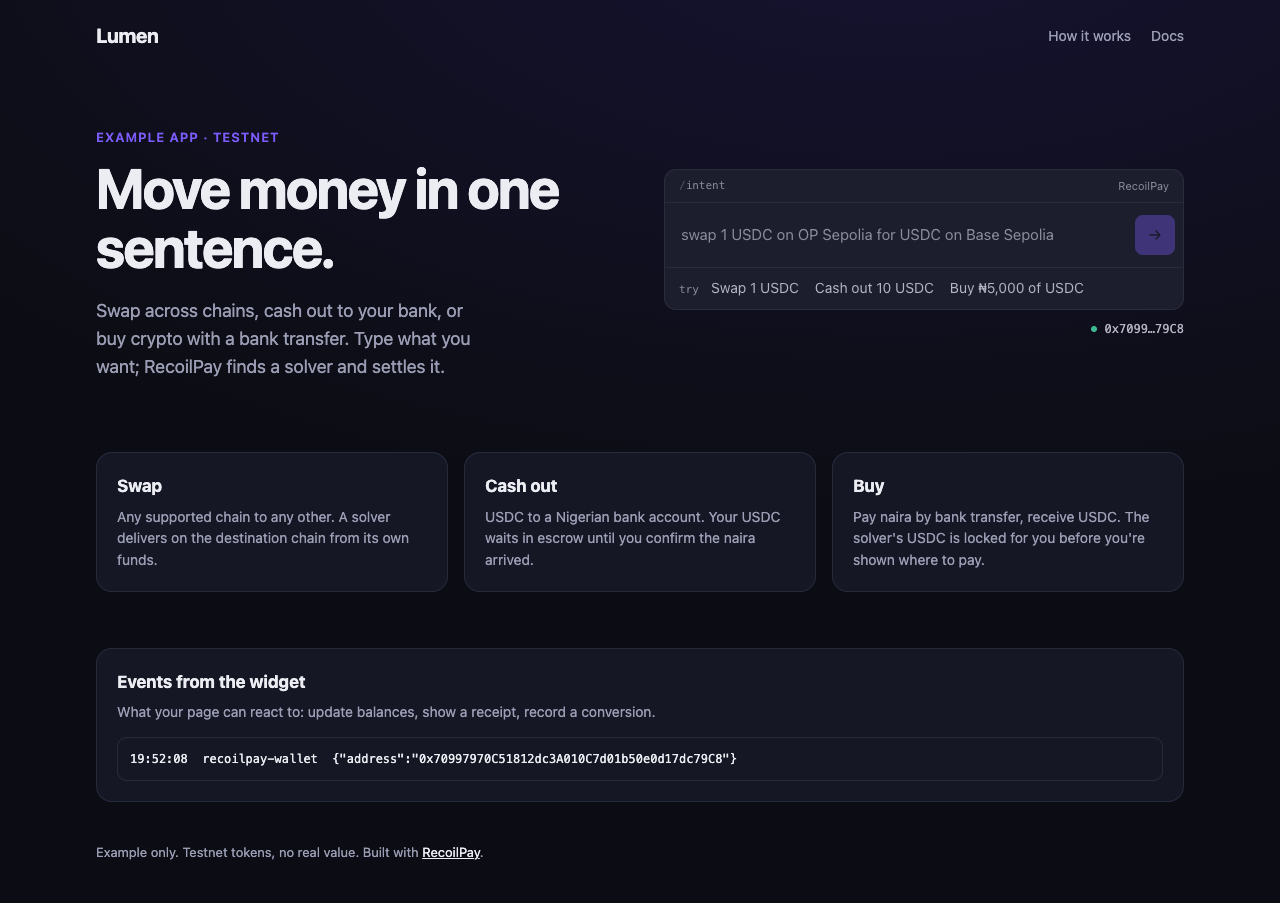
Time: about 15 minutes. You'll need: a code editor, Node.js (only to serve the page locally), a browser wallet such as MetaMask, and a Hugging Face token.
The finished project is widget-landing in the examples repo.
1. Create the project
Make a folder with four files:
mkdir lumen && cd lumen
touch index.html styles.css config.example.js .gitignore
| File | What it's for |
|---|---|
index.html | The page, and the widget |
styles.css | The page's look |
config.example.js | A template for your keys |
.gitignore | Keeps your real keys out of git |
2. Write the page
Start with the page itself: a nav, a hero with the pitch, three feature cards and an events panel. In index.html:
<!doctype html>
<html lang="en">
  <head>
    <meta charset="utf-8" />
    <meta name="viewport" content="width=device-width, initial-scale=1" />
    <title>Lumen: move money in one sentence</title>
    <link rel="stylesheet" href="./styles.css" />
  </head>
  <body>
    <header class="nav">
      <span class="logo">Lumen</span>
      <nav>
        <a href="#how">How it works</a>
        <a href="https://docs.recoilpay.com/integrate/widget">Docs</a>
      </nav>
    </header>

    <main>
      <section class="hero">
        <div class="hero-copy">
          <p class="eyebrow">Example app · testnet</p>
          <h1>Move money in one sentence.</h1>
          <p class="lede">
            Swap across chains, cash out to your bank, or buy crypto with a bank transfer. Type what you want; RecoilPay finds a solver and
            settles it.
          </p>
        </div>

        <!-- The widget goes here in step 3. -->
      </section>

      <section id="how" class="how">
        <article>
          <h2>Swap</h2>
          <p>Any supported chain to any other. A solver delivers on the destination chain from its own funds.</p>
        </article>
        <article>
          <h2>Cash out</h2>
          <p>USDC to a Nigerian bank account. Your USDC waits in escrow until you confirm the naira arrived.</p>
        </article>
        <article>
          <h2>Buy</h2>
          <p>Pay naira by bank transfer, receive USDC. The solver's USDC is locked for you before you're shown where to pay.</p>
        </article>
      </section>

      <section class="events">
        <h2>Events from the widget</h2>
        <p>What your page can react to: update balances, show a receipt, record a conversion.</p>
        <pre id="log">(nothing yet)</pre>
      </section>
    </main>

    <footer>Example only. Testnet tokens have no value; a bank transfer can be real naira. Built with <a href="https://docs.recoilpay.com">RecoilPay</a>.</footer>
  </body>
</html>
Then the styles. Nothing here is specific to RecoilPay. The widget renders in its own Shadow DOM, so none of the page's CSS reaches it. It only borrows the page's font. Paste this into styles.css:
styles.css
:root {
  --bg: #0c0d14;
  --surface: #151724;
  --line: #262a3d;
  --ink: #ecedf3;
  --muted: #9a9db3;
  --accent: #7c5cff;
  font-family: Inter, system-ui, -apple-system, 'Segoe UI', sans-serif;
  color-scheme: dark;
}

* {
  box-sizing: border-box;
}

body {
  margin: 0;
  min-height: 100vh;
  background: radial-gradient(1200px 600px at 70% -10%, #2a1f6b55, transparent), var(--bg);
  color: var(--ink);
  line-height: 1.55;
}

a {
  color: var(--ink);
}

.nav {
  display: flex;
  align-items: center;
  justify-content: space-between;
  max-width: 1120px;
  margin: 0 auto;
  padding: 20px 16px;
}

.logo {
  font-weight: 700;
  font-size: 20px;
  letter-spacing: -0.02em;
}

.nav nav {
  display: flex;
  gap: 20px;
  font-size: 14px;
}

.nav a {
  color: var(--muted);
  text-decoration: none;
}

main {
  max-width: 1120px;
  margin: 0 auto;
  padding: 0 16px;
}

.hero {
  display: grid;
  grid-template-columns: 1fr 1fr;
  gap: 48px;
  align-items: center;
  padding: 56px 0 72px;
}

.eyebrow {
  margin: 0 0 12px;
  color: var(--accent);
  font-size: 13px;
  font-weight: 600;
  text-transform: uppercase;
  letter-spacing: 0.08em;
}

h1 {
  margin: 0;
  font-size: clamp(36px, 5vw, 56px);
  line-height: 1.05;
  letter-spacing: -0.03em;
}

.lede {
  margin: 20px 0 0;
  color: var(--muted);
  font-size: 18px;
  max-width: 34ch;
}

.hero-widget {
  display: block;
}

.how {
  display: grid;
  grid-template-columns: repeat(3, 1fr);
  gap: 16px;
  padding-bottom: 56px;
}

.how article,
.events {
  background: var(--surface);
  border: 1px solid var(--line);
  border-radius: 16px;
  padding: 20px;
}

.how h2,
.events h2 {
  margin: 0 0 6px;
  font-size: 17px;
}

.how p,
.events p {
  margin: 0;
  color: var(--muted);
  font-size: 14px;
}

.events pre {
  margin: 14px 0 0;
  padding: 12px;
  max-height: 220px;
  overflow: auto;
  border: 1px solid var(--line);
  border-radius: 10px;
  font-size: 12px;
  white-space: pre-wrap;
  word-break: break-all;
}

footer {
  max-width: 1120px;
  margin: 0 auto;
  padding: 40px 16px;
  color: var(--muted);
  font-size: 13px;
}

@media (max-width: 860px) {
  .hero,
  .how {
    grid-template-columns: 1fr;
  }
  .hero {
    padding-top: 24px;
    gap: 28px;
  }
}
3. Add the widget
Two lines. Load the widget's script once in the <head>, after the stylesheet:
<script type="module" src="https://cdn.jsdelivr.net/npm/@recoilpay/intent-widget@0.7/dist/recoilpay-intent-widget.js"></script>
Then place the element in the hero, where the comment is:
<recoilpay-intent id="recoilpay" class="hero-widget"></recoilpay-intent>
@0.7 follows the 0.7 line, so Ada gets fixes without breaking changes. The element is 100% wide up to 640px, and the hero's grid gives it half the page.
4. Keep the keys out of the HTML
The widget needs a Hugging Face token to understand typed sentences, and optionally a WalletConnect project id for mobile wallets. Both end up in the browser anyway, but Ada doesn't want them committed. So they live in a config.js that git ignores, with a template next to it.
In config.example.js:
// Copy this file to config.js and fill it in. config.js is gitignored.
//
// Both values end up in the page, so anyone who loads it can read them:
// use keys made for this purpose (see README.md).
window.RECOILPAY_CONFIG = {
  // Hugging Face token for plain-English input. Without it, typed sentences
  // aren't understood. https://huggingface.co/settings/tokens
  hfAccessToken: '',

  // Reown (WalletConnect) project id, for mobile wallets. Optional: browser
  // wallets such as MetaMask work without it. https://cloud.reown.com
  walletConnectProjectId: '',

  // Leave empty for RecoilPay's API. Only set it if we gave you another URL.
  apiUrl: '',
};
In .gitignore:
config.js
Copy the template and fill in your token:
cp config.example.js config.js
Load it in the <head>, before the widget's script:
<script src="./config.js"></script>
5. Configure the widget and listen to it
Last, a script at the end of <body> that reads the config, sets the widget's attributes, adds example sentences, and logs every event:
<script>
  const widget = document.getElementById('recoilpay');
  const config = window.RECOILPAY_CONFIG || {};
  if (config.hfAccessToken) widget.setAttribute('hf-access-token', config.hfAccessToken);
  if (config.walletConnectProjectId) widget.setAttribute('walletconnect-project-id', config.walletConnectProjectId);
  if (config.apiUrl) widget.setAttribute('api-url', config.apiUrl);
  widget.setAttribute('accent', '#7c5cff');

  // Properties (unlike attributes) need the element to be defined first.
  customElements.whenDefined('recoilpay-intent').then(() => {
    widget.examples = [
      { label: 'Swap 1 USDC', sentence: 'swap 1 USDC on OP Sepolia for USDC on Base Sepolia' },
      { label: 'Cash out 10 USDC', sentence: 'cash out 10 USDC on Base Sepolia to NGN' },
      { label: 'Buy ₦5,000 of USDC', sentence: 'buy ₦5,000 of USDC on Base Sepolia' },
    ];
  });

  const log = document.getElementById('log');
  const events = [
    'recoilpay-wallet',
    'recoilpay-order-submitted',
    'recoilpay-complete',
    'recoilpay-error',
    'recoilpay-cash-out-started',
    'recoilpay-cash-out-ended',
    'recoilpay-purchase-started',
    'recoilpay-purchase-ended',
  ];
  for (const name of events) {
    document.addEventListener(name, (event) => {
      if (log.textContent === '(nothing yet)') log.textContent = '';
      log.textContent = `${new Date().toLocaleTimeString()}  ${name}  ${JSON.stringify(event.detail)}\n` + log.textContent;
    });
  }
</script>
Three things to notice:
- Attributes can be set any time. The widget picks up changes, so this script doesn't wait for anything.
examplesis a property, not an attribute, so it's set once the element is defined. The widget's script is a module and loads after this one, so setting it straight away would be lost.- Events bubble to
document, so one listener per event name covers every widget on the page. In a real site, this is where Ada would refresh a balance or record a conversion.
6. Run it
npx serve .
Open the address it prints (usually http://localhost:3000), connect your wallet, and click an example:
- Swap 1 USDC shows the best solver quote, then your wallet asks for an approval (first time) and a signature.
- Cash out 10 USDC shows the offer and a form for your bank details.
- Buy ₦5,000 of USDC runs a one-time identity check, then shows where to pay.
You'll need testnet tokens: see Supported networks. Cash-outs and purchases go through only when a solver is offering them.
Watch the events panel as you go: recoilpay-wallet when you connect, then recoilpay-order-submitted and recoilpay-complete for a swap, or the cash-out and purchase events.
Before Ada ships it
- Her Hugging Face token is a fine-grained token with only "Make calls to Inference Providers", used for nothing else.
- If the site sends a Content-Security-Policy, it allows the widget's hosts. See the CSP table, plus
widget.dojah.ioandidentity.dojah.iofor the identity check. -
config.jsis generated at deploy time from her hosting's environment variables, not committed.
The complete page
<!doctype html>
<html lang="en">
  <head>
    <meta charset="utf-8" />
    <meta name="viewport" content="width=device-width, initial-scale=1" />
    <link rel="icon" href="data:image/svg+xml,%3Csvg xmlns=%22http://www.w3.org/2000/svg%22 viewBox=%220 0 32 32%22%3E%3Crect width=%2232%22 height=%2232%22 rx=%228%22 fill=%22%237c5cff%22/%3E%3C/svg%3E" />
    <title>Lumen: move money in one sentence</title>
    <link rel="stylesheet" href="./styles.css" />

    <!-- Your keys: copy config.example.js to config.js and fill it in. -->
    <script src="./config.js"></script>

    <!-- 1. Load the RecoilPay widget once per page. -->
    <script type="module" src="https://cdn.jsdelivr.net/npm/@recoilpay/intent-widget@0.7/dist/recoilpay-intent-widget.js"></script>
  </head>
  <body>
    <header class="nav">
      <span class="logo">Lumen</span>
      <nav>
        <a href="#how">How it works</a>
        <a href="https://docs.recoilpay.com/integrate/widget">Docs</a>
      </nav>
    </header>

    <main>
      <section class="hero">
        <div class="hero-copy">
          <p class="eyebrow">Example app · testnet</p>
          <h1>Move money in one sentence.</h1>
          <p class="lede">
            Swap across chains, cash out to your bank, or buy crypto with a bank transfer. Type what you want; RecoilPay finds a solver and
            settles it.
          </p>
        </div>

        <!-- 2. Place the widget. Everything except the tag name is optional. -->
        <recoilpay-intent id="recoilpay" class="hero-widget"></recoilpay-intent>
      </section>

      <section id="how" class="how">
        <article>
          <h2>Swap</h2>
          <p>Any supported chain to any other. A solver delivers on the destination chain from its own funds.</p>
        </article>
        <article>
          <h2>Cash out</h2>
          <p>USDC to a Nigerian bank account. Your USDC waits in escrow until you confirm the naira arrived.</p>
        </article>
        <article>
          <h2>Buy</h2>
          <p>Pay naira by bank transfer, receive USDC. The solver's USDC is locked for you before you're shown where to pay.</p>
        </article>
      </section>

      <section class="events">
        <h2>Events from the widget</h2>
        <p>What your page can react to: update balances, show a receipt, record a conversion.</p>
        <pre id="log">(nothing yet)</pre>
      </section>
    </main>

    <footer>Example only. Testnet tokens have no value; a bank transfer can be real naira. Built with <a href="https://docs.recoilpay.com">RecoilPay</a>.</footer>

    <script>
      // 3. Configure it from config.js, and listen for what happens.
      const widget = document.getElementById('recoilpay');
      const config = window.RECOILPAY_CONFIG || {};
      if (config.hfAccessToken) widget.setAttribute('hf-access-token', config.hfAccessToken);
      if (config.walletConnectProjectId) widget.setAttribute('walletconnect-project-id', config.walletConnectProjectId);
      if (config.apiUrl) widget.setAttribute('api-url', config.apiUrl);
      widget.setAttribute('accent', '#7c5cff');

      // Properties (unlike attributes) need the element to be defined first.
      customElements.whenDefined('recoilpay-intent').then(() => {
        widget.examples = [
          { label: 'Swap 1 USDC', sentence: 'swap 1 USDC on OP Sepolia for USDC on Base Sepolia' },
          { label: 'Cash out 10 USDC', sentence: 'cash out 10 USDC on Base Sepolia to NGN' },
          { label: 'Buy ₦5,000 of USDC', sentence: 'buy ₦5,000 of USDC on Base Sepolia' },
        ];
      });

      const log = document.getElementById('log');
      const events = [
        'recoilpay-wallet',
        'recoilpay-order-submitted',
        'recoilpay-complete',
        'recoilpay-error',
        'recoilpay-cash-out-started',
        'recoilpay-cash-out-ended',
        'recoilpay-purchase-started',
        'recoilpay-purchase-ended',
      ];
      for (const name of events) {
        document.addEventListener(name, (event) => {
          if (log.textContent === '(nothing yet)') log.textContent = '';
          log.textContent = `${new Date().toLocaleTimeString()}  ${name}  ${JSON.stringify(event.detail)}\n` + log.textContent;
        });
      }
    </script>
  </body>
</html>
Next: Build a React landing page · Everything the widget can do