Build a React landing page
Tunde's team builds Lumen's web app in React. Users already sign in with their wallet through RainbowKit. Now they want RecoilPay on the homepage: swaps, cash-outs and purchases, using the wallet the user already connected, with no second "connect" step.
In this tutorial you'll build that app from a fresh Vite project. You'll set up wagmi and RainbowKit, drop in <RecoilIntent />, wire its callbacks to an activity panel, and make sure a user who reloads mid cash-out lands back on it.
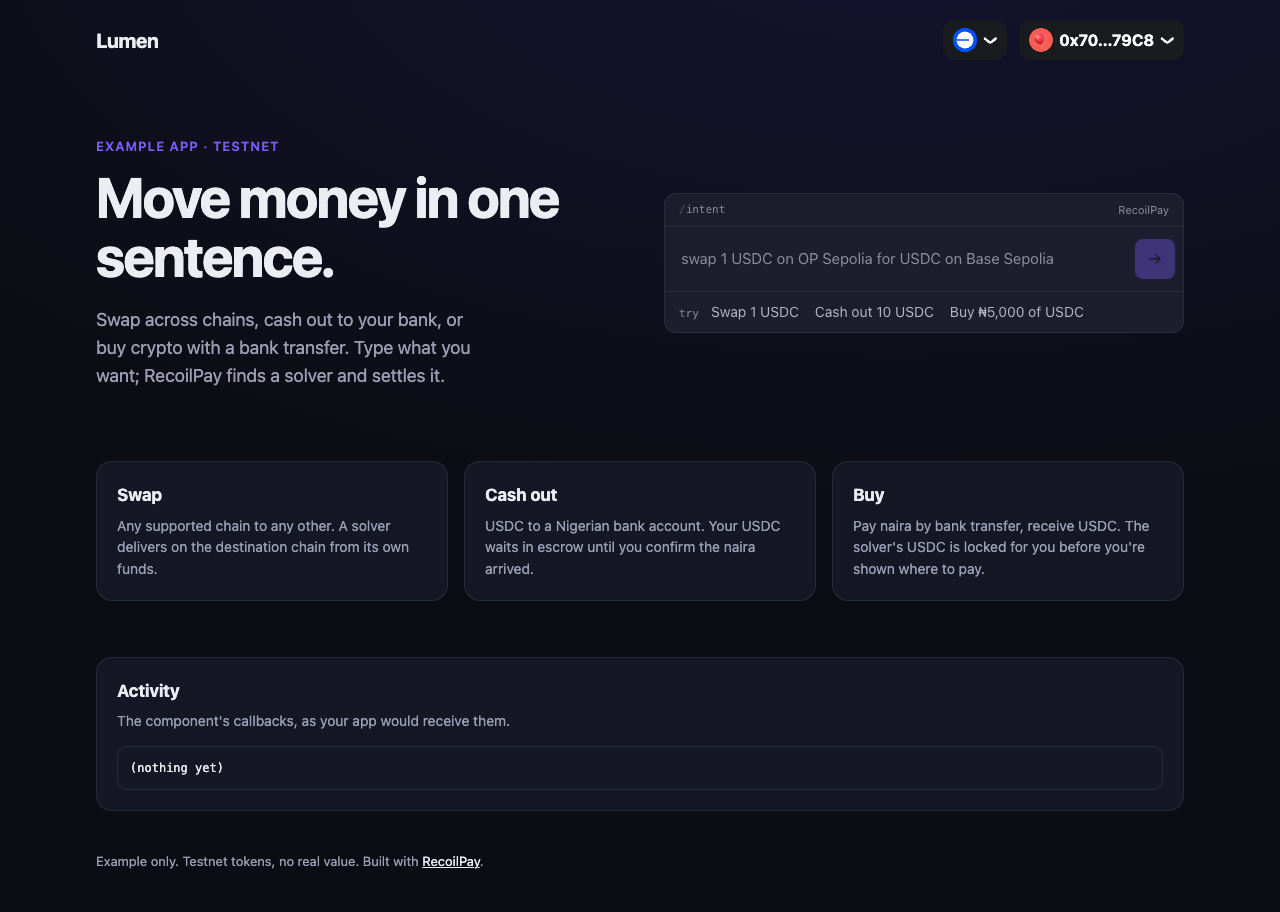
Time: about 30 minutes. You'll need: Node.js 20 or later, a browser wallet such as MetaMask, and a Hugging Face token. A WalletConnect project id is optional.
The finished project is react-landing in the examples repo.
1. Create the project
npm create vite@latest lumen -- --template react-ts
cd lumen
npm install
Install RecoilPay's React component and the wallet stack it plugs into:
npm install @recoilpay/intent-react @recoilpay/intent-core wagmi@2 viem @tanstack/react-query @rainbow-me/rainbowkit
wagmi@2, not the latest major: RainbowKit and @recoilpay/intent-react both work with wagmi 2.
Remove the template's demo files, which the next steps replace:
rm src/App.css src/index.css
rm -r src/assets
In index.html, change the <title> to Lumen: move money in one sentence. Leave the rest.
2. Add your keys
Vite exposes VITE_* variables to the browser. Create .env.local, which the template's .gitignore already keeps out of git:
VITE_HF_ACCESS_TOKEN=hf_…
VITE_WALLETCONNECT_PROJECT_ID=
VITE_RECOILPAY_API_URL=
VITE_HF_ACCESS_TOKENlets the component understand typed sentences. It ships in the bundle, so use a fine-grained token with only "Make calls to Inference Providers".VITE_WALLETCONNECT_PROJECT_IDis optional. Leave it empty and only browser wallets are offered.VITE_RECOILPAY_API_URLstays empty for RecoilPay's API.
3. Configure wagmi
RecoilPay runs on five testnets, and the component asks the wallet to switch to whichever one an intent needs, so all of them go in the config. Tunde also wants the app to work before the team has a WalletConnect project id, so with no id the config falls back to browser wallets.
Create src/wagmi.ts:
import { connectorsForWallets, getDefaultConfig } from '@rainbow-me/rainbowkit';
import { injectedWallet } from '@rainbow-me/rainbowkit/wallets';
import { createConfig, http } from 'wagmi';
import { baseSepolia, bscTestnet, optimismSepolia, polygonAmoy, sepolia } from 'wagmi/chains';

// The testnets RecoilPay runs on. The component asks the wallet to switch to
// whichever one an intent needs.
const chains = [baseSepolia, optimismSepolia, sepolia, polygonAmoy, bscTestnet] as const;

const projectId = import.meta.env.VITE_WALLETCONNECT_PROJECT_ID;

// With a WalletConnect project id, RainbowKit's full wallet list (mobile
// wallets included). Without one, browser wallets only.
export const wagmiConfig = projectId
  ? getDefaultConfig({ appName: 'Lumen', projectId, chains })
  : createConfig({
      chains,
      connectors: connectorsForWallets([{ groupName: 'Browser wallets', wallets: [injectedWallet] }], {
        appName: 'Lumen',
        projectId: 'not-used-without-walletconnect',
      }),
      transports: Object.fromEntries(chains.map((c) => [c.id, http()])) as Record<(typeof chains)[number]['id'], ReturnType<typeof http>>,
    });
4. Wire up the providers
Replace src/main.tsx. Besides the usual wagmi, React Query and RainbowKit providers, it imports RecoilPay's stylesheet. Every rule in it is scoped under .rp-root, so it won't touch the rest of the app.
import '@rainbow-me/rainbowkit/styles.css';
import '@recoilpay/intent-react/styles.css';
import './styles.css';

import { darkTheme, RainbowKitProvider } from '@rainbow-me/rainbowkit';
import { QueryClient, QueryClientProvider } from '@tanstack/react-query';
import { StrictMode } from 'react';
import { createRoot } from 'react-dom/client';
import { WagmiProvider } from 'wagmi';
import { App } from './App';
import { wagmiConfig } from './wagmi';

const queryClient = new QueryClient();

createRoot(document.getElementById('root')!).render(
  <StrictMode>
    <WagmiProvider config={wagmiConfig}>
      <QueryClientProvider client={queryClient}>
        <RainbowKitProvider theme={darkTheme({ accentColor: '#7c5cff' })}>
          <App />
        </RainbowKitProvider>
      </QueryClientProvider>
    </WagmiProvider>
  </StrictMode>,
);
The page's own styles go in src/styles.css. Nothing in them is specific to RecoilPay:
src/styles.css
:root {
  --bg: #0c0d14;
  --surface: #151724;
  --line: #262a3d;
  --ink: #ecedf3;
  --muted: #9a9db3;
  --accent: #7c5cff;
  font-family: Inter, system-ui, -apple-system, 'Segoe UI', sans-serif;
  color-scheme: dark;
}

* {
  box-sizing: border-box;
}

body {
  margin: 0;
  min-height: 100vh;
  background: radial-gradient(1200px 600px at 70% -10%, #2a1f6b55, transparent), var(--bg);
  color: var(--ink);
  line-height: 1.55;
}

a {
  color: var(--ink);
}

.nav {
  display: flex;
  align-items: center;
  justify-content: space-between;
  max-width: 1120px;
  margin: 0 auto;
  padding: 20px 16px;
}

.logo {
  font-weight: 700;
  font-size: 20px;
  letter-spacing: -0.02em;
}

.nav nav {
  display: flex;
  gap: 20px;
  font-size: 14px;
}

.nav a {
  color: var(--muted);
  text-decoration: none;
}

main {
  max-width: 1120px;
  margin: 0 auto;
  padding: 0 16px;
}

.hero {
  display: grid;
  grid-template-columns: 1fr 1fr;
  gap: 48px;
  align-items: center;
  padding: 56px 0 72px;
}

.eyebrow {
  margin: 0 0 12px;
  color: var(--accent);
  font-size: 13px;
  font-weight: 600;
  text-transform: uppercase;
  letter-spacing: 0.08em;
}

h1 {
  margin: 0;
  font-size: clamp(36px, 5vw, 56px);
  line-height: 1.05;
  letter-spacing: -0.03em;
}

.lede {
  margin: 20px 0 0;
  color: var(--muted);
  font-size: 18px;
  max-width: 34ch;
}

.hero-widget {
  display: block;
}

.how {
  display: grid;
  grid-template-columns: repeat(3, 1fr);
  gap: 16px;
  padding-bottom: 56px;
}

.how article,
.events {
  background: var(--surface);
  border: 1px solid var(--line);
  border-radius: 16px;
  padding: 20px;
}

.how h2,
.events h2 {
  margin: 0 0 6px;
  font-size: 17px;
}

.how p,
.events p {
  margin: 0;
  color: var(--muted);
  font-size: 14px;
}

.events pre {
  margin: 14px 0 0;
  padding: 12px;
  max-height: 220px;
  overflow: auto;
  border: 1px solid var(--line);
  border-radius: 10px;
  font-size: 12px;
  white-space: pre-wrap;
  word-break: break-all;
}

footer {
  max-width: 1120px;
  margin: 0 auto;
  padding: 40px 16px;
  color: var(--muted);
  font-size: 13px;
}

@media (max-width: 860px) {
  .hero,
  .how {
    grid-template-columns: 1fr;
  }
  .hero {
    padding-top: 24px;
    gap: 28px;
  }
}

/* The component's root, placed in the hero grid. */
.hero > .rp-root {
  width: 100%;
}
5. Put RecoilPay on the page
Now src/App.tsx. Build it up in three steps.
The header and the component. RainbowKit's ConnectButton goes in the header, where users already expect it. useWagmiIntentWallet() turns whatever wallet wagmi has connected into the one RecoilPay uses. If someone types an intent before connecting, onConnectWallet opens RainbowKit's modal instead of a second picker.
import { ConnectButton, useConnectModal } from '@rainbow-me/rainbowkit';
import { RecoilIntent } from '@recoilpay/intent-react';
import { useWagmiIntentWallet } from '@recoilpay/intent-react/wagmi';

const HF_TOKEN = import.meta.env.VITE_HF_ACCESS_TOKEN || null;
const API_URL = import.meta.env.VITE_RECOILPAY_API_URL || undefined;

export function App() {
  const wallet = useWagmiIntentWallet();
  const { openConnectModal } = useConnectModal();

  return (
    <>
      <header className="nav">
        <span className="logo">Lumen</span>
        <ConnectButton chainStatus="icon" showBalance={false} />
      </header>
      <main>
        <section className="hero">
          {/* the pitch goes here */}
          <RecoilIntent hfAccessToken={HF_TOKEN} apiUrl={API_URL} wallet={wallet} onConnectWallet={openConnectModal} />
        </section>
      </main>
    </>
  );
}
Examples and the brand colour. Clickable sentences show users what they can do, and theme matches Lumen's violet:
const EXAMPLES = [
  { label: 'Swap 1 USDC', sentence: 'swap 1 USDC on OP Sepolia for USDC on Base Sepolia' },
  { label: 'Cash out 10 USDC', sentence: 'cash out 10 USDC on Base Sepolia to NGN' },
  { label: 'Buy ₦5,000 of USDC', sentence: 'buy ₦5,000 of USDC on Base Sepolia' },
];

<RecoilIntent /* … */ examples={EXAMPLES} theme={{ mode: 'dark', accent: '#7c5cff' }} />
Callbacks, and coming back to a trade. A swap settles in under a minute. A cash-out, though, waits for the user to confirm the naira arrived, and a purchase waits for them to pay. Both can outlast a page visit. So Tunde saves the trade id when one starts, clears it when it ends, and passes it back on the next load:
const read = (key: string) => localStorage.getItem(key);
const save = (key: string, id: string | null) => (id ? localStorage.setItem(key, id) : localStorage.removeItem(key));

const [cashOut] = useState(() => read('recoilpay:cash-out'));

<RecoilIntent
  /* … */
  resumeCashOut={cashOut}
  onCashOutStarted={(id) => save('recoilpay:cash-out', id)}
  onCashOutEnded={() => save('recoilpay:cash-out', null)}
/>
Purchases work the same way, with resumePurchase, onPurchaseStarted and onPurchaseEnded. Every callback also writes a line to an activity panel, which is where a real app would refresh balances or track conversions.
Put together, src/App.tsx is:
import { ConnectButton, useConnectModal } from '@rainbow-me/rainbowkit';
import { RecoilIntent } from '@recoilpay/intent-react';
import { useWagmiIntentWallet } from '@recoilpay/intent-react/wagmi';
import { useState } from 'react';

const HF_TOKEN = import.meta.env.VITE_HF_ACCESS_TOKEN || null;
const API_URL = import.meta.env.VITE_RECOILPAY_API_URL || undefined;

const EXAMPLES = [
  { label: 'Swap 1 USDC', sentence: 'swap 1 USDC on OP Sepolia for USDC on Base Sepolia' },
  { label: 'Cash out 10 USDC', sentence: 'cash out 10 USDC on Base Sepolia to NGN' },
  { label: 'Buy ₦5,000 of USDC', sentence: 'buy ₦5,000 of USDC on Base Sepolia' },
];

// A cash-out or purchase can outlast a visit: the user comes back to confirm
// the money arrived, or to pay. Keep its id so the component can show it again.
const read = (key: string) => localStorage.getItem(key);
const save = (key: string, id: string | null) => (id ? localStorage.setItem(key, id) : localStorage.removeItem(key));

export function App() {
  const wallet = useWagmiIntentWallet();
  const { openConnectModal } = useConnectModal();
  const [cashOut] = useState(() => read('recoilpay:cash-out'));
  const [purchase] = useState(() => read('recoilpay:purchase'));
  const [activity, setActivity] = useState<string[]>([]);
  const note = (line: string) => setActivity((a) => [`${new Date().toLocaleTimeString()}  ${line}`, ...a].slice(0, 20));

  return (
    <>
      <header className="nav">
        <span className="logo">Lumen</span>
        <ConnectButton chainStatus="icon" showBalance={false} />
      </header>

      <main>
        <section className="hero">
          <div className="hero-copy">
            <p className="eyebrow">Example app · testnet</p>
            <h1>Move money in one sentence.</h1>
            <p className="lede">
              Swap across chains, cash out to your bank, or buy crypto with a bank transfer. Type what you want; RecoilPay finds a solver and
              settles it.
            </p>
          </div>

          <RecoilIntent
            hfAccessToken={HF_TOKEN}
            apiUrl={API_URL}
            wallet={wallet}
            onConnectWallet={openConnectModal}
            examples={EXAMPLES}
            theme={{ mode: 'dark', accent: '#7c5cff' }}
            onOrderSubmitted={(orderId) => note(`swap submitted: ${orderId}`)}
            onComplete={(state) => note(`swap finished: ${state.status ?? 'done'}`)}
            onError={(message) => note(`error: ${message}`)}
            resumeCashOut={cashOut}
            onCashOutStarted={(id) => {
              save('recoilpay:cash-out', id);
              note(`cash-out started: ${id}`);
            }}
            onCashOutEnded={(trade) => {
              save('recoilpay:cash-out', null);
              note(`cash-out ended: ${trade.state}`);
            }}
            resumePurchase={purchase}
            onPurchaseStarted={(id) => {
              save('recoilpay:purchase', id);
              note(`purchase started: ${id}`);
            }}
            onPurchaseEnded={(trade) => {
              save('recoilpay:purchase', null);
              note(`purchase ended: ${trade.state}`);
            }}
          />
        </section>

        <section className="how">
          <article>
            <h2>Swap</h2>
            <p>Any supported chain to any other. A solver delivers on the destination chain from its own funds.</p>
          </article>
          <article>
            <h2>Cash out</h2>
            <p>USDC to a Nigerian bank account. Your USDC waits in escrow until you confirm the naira arrived.</p>
          </article>
          <article>
            <h2>Buy</h2>
            <p>Pay naira by bank transfer, receive USDC. The solver's USDC is locked for you before you're shown where to pay.</p>
          </article>
        </section>

        <section className="events">
          <h2>Activity</h2>
          <p>The component's callbacks, as your app would receive them.</p>
          <pre>{activity.length ? activity.join('\n') : '(nothing yet)'}</pre>
        </section>
      </main>

      <footer>
        Example only. Testnet tokens have no value; a bank transfer can be real naira. Built with <a href="https://docs.recoilpay.com">RecoilPay</a>.
      </footer>
    </>
  );
}
6. Run it
npm run dev
Open http://localhost:5173, connect with the button in the header, then click an example in the intent field. The activity panel fills in as you go: a swap logs its order id, then its final status, and a cash-out or purchase logs its trade id when it starts.
Try the reload: start a cash-out, wait for the "Did ₦… arrive?" step, and reload the page. The component comes back to that step.
You'll need testnet tokens: see Supported networks. Cash-outs and purchases go through only when a solver is offering them.
7. Build for production
npm run build
The bundle is about 300 KB gzipped, most of it the wallet libraries. Before deploying:
- Set the
VITE_*variables in your hosting, not in a committed file. - If you send a Content-Security-Policy, allow RecoilPay's API,
router.huggingface.co, the RPCs from/api/v1/chains, andwidget.dojah.io/identity.dojah.iofor the identity check. See the CSP table. - Save trade ids somewhere that follows the user, such as their account, if you want them to finish a cash-out on another device.
Next: Build your own cash-out screens · Every prop of the React component