Build your own cash-out screens
Chika is building Lumen's cash-out page. Lumen's designers want every screen to be Lumen's own: the amount, the offer, the bank form, the progress. No RecoilPay component on the page. But Chika doesn't want to deal with escrows, signatures or encryption.
In this tutorial you'll build that page with RecoilPay's headless SDK, @recoilpay/intent-core, and no framework. The SDK finds the best offer, seals the bank details for the solver, runs the escrow and follows the payout. Your code renders each step and handles the buttons.
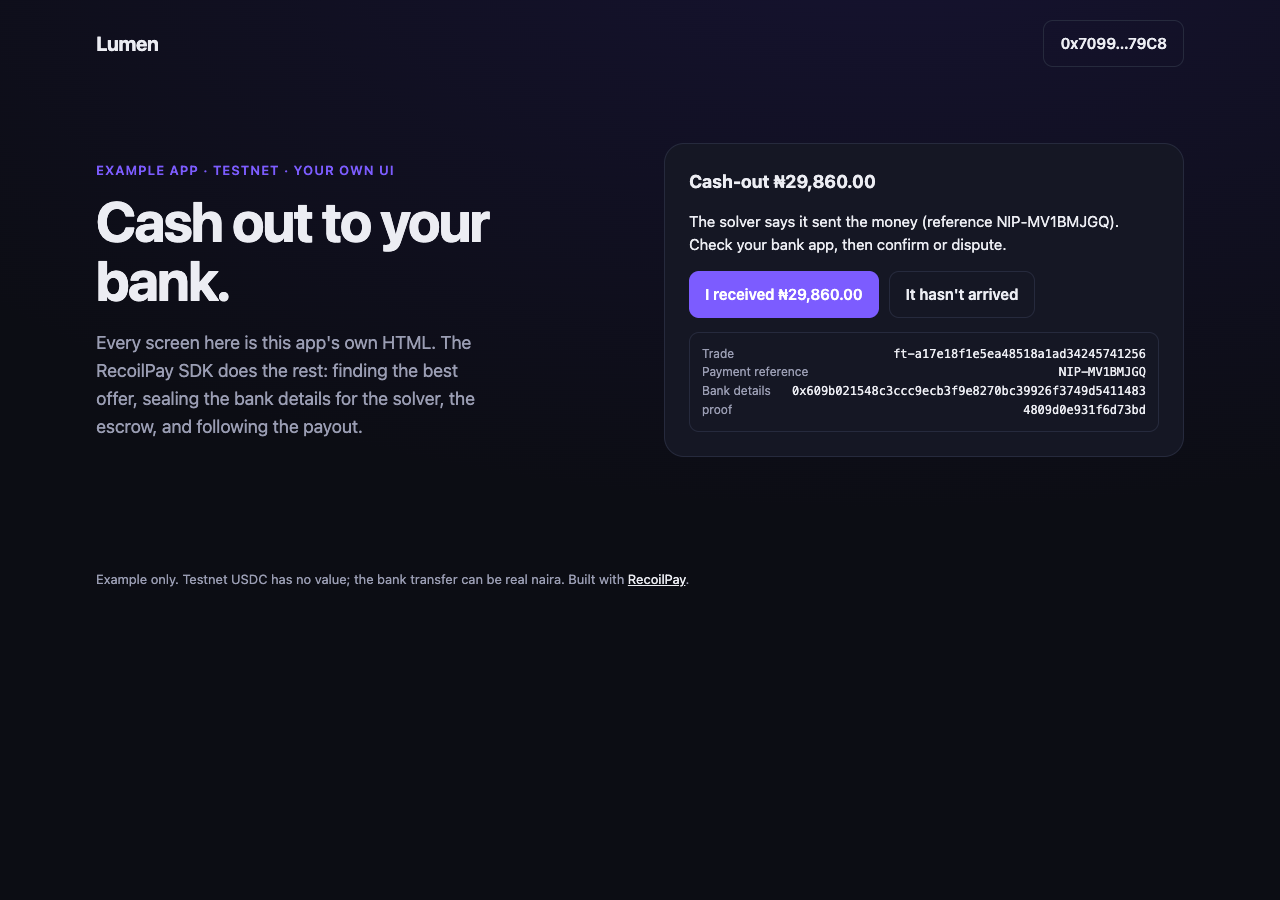
Time: about 45 minutes. You'll need: Node.js 20 or later, and a browser wallet such as MetaMask with testnet USDC on Base Sepolia, Polygon Amoy or BNB Chain Testnet. No API keys: there's no plain-English input, so no Hugging Face token.
The finished project is sdk-custom-ui in the examples repo.
1. Create the project
npm create vite@latest lumen-cash-out -- --template vanilla-ts
cd lumen-cash-out
npm install
npm install @recoilpay/intent-core viem
Remove the template's demo files:
rm src/counter.ts src/style.css
rm -r src/assets
2. Lay out the screens
A cash-out has three screens, all in one card:
- What to cash out: a chain and an amount.
- The offer and your bank: what you'll receive, and the bank details form.
- Following the trade: a status line, the confirm or dispute buttons, and a receipt.
Only one shows at a time. The app hides and shows them as the cash-out moves along. Replace index.html:
<!doctype html>
<html lang="en">
  <head>
    <meta charset="utf-8" />
    <meta name="viewport" content="width=device-width, initial-scale=1" />
    <link rel="icon" href="data:image/svg+xml,%3Csvg xmlns=%22http://www.w3.org/2000/svg%22 viewBox=%220 0 32 32%22%3E%3Crect width=%2232%22 height=%2232%22 rx=%228%22 fill=%22%237c5cff%22/%3E%3C/svg%3E" />
    <title>Lumen: cash out to your bank</title>
  </head>
  <body>
    <header class="nav">
      <span class="logo">Lumen</span>
      <button id="connect" class="button button-quiet" type="button">Connect wallet</button>
    </header>

    <main>
      <section class="hero">
        <div class="hero-copy">
          <p class="eyebrow">Example app · testnet · your own UI</p>
          <h1>Cash out to your bank.</h1>
          <p class="lede">
            Every screen here is this app's own HTML. The RecoilPay SDK does the rest: finding the best offer, sealing the bank details for the
            solver, the escrow, and following the payout.
          </p>
        </div>

        <div class="card" id="app">
          <!-- 1. What to cash out -->
          <form id="amount-form" class="stack">
            <h2>What to cash out</h2>
            <label class="field">
              <span>From</span>
              <select id="chain" required></select>
            </label>
            <label class="field">
              <span>Amount (USDC)</span>
              <input id="amount" inputmode="decimal" value="10" required />
            </label>
            <button class="button" type="submit">See the offer</button>
          </form>

          <!-- 2. The offer and the bank details -->
          <form id="bank-form" class="stack" hidden>
            <h2>Your bank</h2>
            <p id="offer" class="offer"></p>
            <label class="field">
              <span>Bank</span>
              <select id="bank" required><option value="">Choose your bank</option></select>
            </label>
            <label class="field">
              <span>Account number (NUBAN)</span>
              <input id="account" inputmode="numeric" autocomplete="off" maxlength="10" required />
            </label>
            <label class="field">
              <span>Name on the account</span>
              <input id="name" autocomplete="name" required />
            </label>
            <p class="fineprint">Encrypted on this device for the one solver who pays you. Neither this app nor RecoilPay sees it.</p>
            <p id="bank-error" class="error" hidden></p>
            <div class="row">
              <button id="cash-out" class="button" type="submit">Cash out</button>
              <button id="cancel" class="button button-quiet" type="button">Cancel</button>
            </div>
          </form>

          <!-- 3. Following the trade -->
          <div id="progress" class="stack" hidden>
            <h2 id="progress-title">Cash-out</h2>
            <p id="status" class="status"></p>
            <div id="answer" class="row" hidden>
              <button id="received" class="button" type="button">I received it</button>
              <button id="not-arrived" class="button button-quiet" type="button">It hasn't arrived</button>
            </div>
            <form id="dispute-form" class="stack" hidden>
              <label class="field">
                <span>What happened?</span>
                <input id="reason" placeholder="Nothing arrived in my account" required />
              </label>
              <div class="row">
                <button class="button button-danger" type="submit">Open a dispute</button>
                <button id="dispute-cancel" class="button button-quiet" type="button">Back</button>
              </div>
            </form>
            <dl id="receipt" class="receipt" hidden></dl>
            <button id="again" class="button button-quiet" type="button" hidden>Cash out again</button>
          </div>

          <p id="message" class="error" hidden></p>
        </div>
      </section>
    </main>

    <footer>Example only. Testnet USDC has no value; the bank transfer can be real naira. Built with <a href="https://docs.recoilpay.com">RecoilPay</a>.</footer>

    <script type="module" src="/src/main.ts"></script>
  </body>
</html>
And the styles, in src/styles.css:
src/styles.css
:root {
  --bg: #0c0d14;
  --surface: #151724;
  --line: #262a3d;
  --ink: #ecedf3;
  --muted: #9a9db3;
  --accent: #7c5cff;
  font-family: Inter, system-ui, -apple-system, 'Segoe UI', sans-serif;
  color-scheme: dark;
}

* {
  box-sizing: border-box;
}

body {
  margin: 0;
  min-height: 100vh;
  background: radial-gradient(1200px 600px at 70% -10%, #2a1f6b55, transparent), var(--bg);
  color: var(--ink);
  line-height: 1.55;
}

a {
  color: var(--ink);
}

.nav {
  display: flex;
  align-items: center;
  justify-content: space-between;
  max-width: 1120px;
  margin: 0 auto;
  padding: 20px 16px;
}

.logo {
  font-weight: 700;
  font-size: 20px;
  letter-spacing: -0.02em;
}

.nav nav {
  display: flex;
  gap: 20px;
  font-size: 14px;
}

.nav a {
  color: var(--muted);
  text-decoration: none;
}

main {
  max-width: 1120px;
  margin: 0 auto;
  padding: 0 16px;
}

.hero {
  display: grid;
  grid-template-columns: 1fr 1fr;
  gap: 48px;
  align-items: center;
  padding: 56px 0 72px;
}

.eyebrow {
  margin: 0 0 12px;
  color: var(--accent);
  font-size: 13px;
  font-weight: 600;
  text-transform: uppercase;
  letter-spacing: 0.08em;
}

h1 {
  margin: 0;
  font-size: clamp(36px, 5vw, 56px);
  line-height: 1.05;
  letter-spacing: -0.03em;
}

.lede {
  margin: 20px 0 0;
  color: var(--muted);
  font-size: 18px;
  max-width: 34ch;
}

.hero-widget {
  display: block;
}

.how {
  display: grid;
  grid-template-columns: repeat(3, 1fr);
  gap: 16px;
  padding-bottom: 56px;
}

.how article,
.events {
  background: var(--surface);
  border: 1px solid var(--line);
  border-radius: 16px;
  padding: 20px;
}

.how h2,
.events h2 {
  margin: 0 0 6px;
  font-size: 17px;
}

.how p,
.events p {
  margin: 0;
  color: var(--muted);
  font-size: 14px;
}

.events pre {
  margin: 14px 0 0;
  padding: 12px;
  max-height: 220px;
  overflow: auto;
  border: 1px solid var(--line);
  border-radius: 10px;
  font-size: 12px;
  white-space: pre-wrap;
  word-break: break-all;
}

footer {
  max-width: 1120px;
  margin: 0 auto;
  padding: 40px 16px;
  color: var(--muted);
  font-size: 13px;
}

@media (max-width: 860px) {
  .hero,
  .how {
    grid-template-columns: 1fr;
  }
  .hero {
    padding-top: 24px;
    gap: 28px;
  }
}

/* ── This example's own UI: the card, fields and buttons ── */
.card {
  background: var(--surface);
  border: 1px solid var(--line);
  border-radius: 20px;
  padding: 24px;
}

.card h2 {
  margin: 0;
  font-size: 18px;
}

.stack {
  display: flex;
  flex-direction: column;
  gap: 14px;
}

.row {
  display: flex;
  flex-wrap: wrap;
  gap: 10px;
}

[hidden] {
  display: none !important;
}

.field {
  display: flex;
  flex-direction: column;
  gap: 6px;
  font-size: 13px;
  color: var(--muted);
}

.field input,
.field select {
  font: inherit;
  font-size: 15px;
  color: var(--ink);
  background: var(--bg);
  border: 1px solid var(--line);
  border-radius: 10px;
  padding: 10px 12px;
}

.field input:focus,
.field select:focus {
  outline: 2px solid var(--accent);
  outline-offset: 1px;
}

.button {
  font: inherit;
  font-size: 15px;
  font-weight: 600;
  color: #fff;
  background: var(--accent);
  border: 0;
  border-radius: 10px;
  padding: 11px 16px;
  cursor: pointer;
}

.button-quiet {
  color: var(--ink);
  background: transparent;
  border: 1px solid var(--line);
}

.button-danger {
  background: #d9485f;
}

.offer,
.status {
  margin: 0;
  font-size: 15px;
}

.fineprint {
  margin: 0;
  font-size: 12px;
  color: var(--muted);
}

.error {
  margin: 12px 0 0;
  color: #ff8a9b;
  font-size: 14px;
}

.receipt {
  margin: 0;
  padding: 12px;
  border: 1px solid var(--line);
  border-radius: 10px;
  font-size: 12px;
}

.receipt div {
  display: flex;
  justify-content: space-between;
  gap: 12px;
}

.receipt dt {
  color: var(--muted);
}

.receipt dd {
  margin: 0;
  font-family: ui-monospace, Menlo, monospace;
  word-break: break-all;
  text-align: right;
}
3. Add the cash-out module
This module is the RecoilPay part. It finds the chains that cash out, builds the request, creates a session, checks bank details, and turns each phase into words. It's the code from Build a cash-out flow, which explains each function. Create src/cash-out.ts:
src/cash-out.ts
// From the guide "Build a cash-out flow": https://docs.recoilpay.com/integrate/guides/cash-out

import {
  createOfframpSession,
  FIAT_CORRIDORS,
  NG_BANKS,
  viemWallet,
  type OfframpRequest,
  type OfframpSession,
  type OfframpState,
} from '@recoilpay/intent-core';
import { getAddress, parseUnits, type WalletClient } from 'viem';

export const API_URL = 'https://api.recoilpay.com';

// ── Step 2: find where cash-outs run ─────────────────────────────────────
export interface CashOutChain {
  chainId: number;
  name: string;
  usdc: { address: `0x${string}`; decimals: number };
}

export async function cashOutChains(apiUrl = API_URL): Promise<CashOutChain[]> {
  const res = await fetch(`${apiUrl}/api/v1/chains`);
  const { data } = await res.json();
  return data
    .filter((c: any) => c.fiat_escrow && c.family !== 'solana') // EVM chains: this flow signs with viem
    .flatMap((c: any) => {
      const usdc = c.tokens.find((t: any) => t.symbol === 'USDC');
      return usdc ? [{ chainId: c.chain_id, name: c.name, usdc: { address: getAddress(usdc.address), decimals: usdc.decimals } }] : [];
    });
}

// ── Step 3: describe the cash-out ────────────────────────────────────────
export function cashOutRequest(chain: CashOutChain, amount: string): OfframpRequest {
  return {
    chainId: chain.chainId,
    chainName: chain.name,
    asset: 'USDC',
    token: chain.usdc.address,
    decimals: chain.usdc.decimals,
    amount: parseUnits(amount, chain.usdc.decimals),
    corridor: FIAT_CORRIDORS.NGN,
  };
}

// ── Step 1 and 4: one session per cash-out ───────────────────────────────
export function startCashOut(walletClient: WalletClient, apiUrl = API_URL): OfframpSession {
  return createOfframpSession({ apiUrl, wallet: viemWallet(walletClient) });
}

// ── Step 5: the bank details form ────────────────────────────────────────
export const BANKS = NG_BANKS; // [{ code: '058', name: 'Guaranty Trust Bank' }, …]

export function bankDetailsProblem(account: string, name: string): string | null {
  if (!FIAT_CORRIDORS.NGN.accountPattern.test(account.trim())) return 'Enter the 10-digit account number (NUBAN).';
  if (name.trim().length < 2) return 'Enter the name on the account.';
  return null;
}

// ── Step 7: what to show for each phase ──────────────────────────────────
export function describe(state: OfframpState): string {
  const p = state.preview;
  switch (state.phase) {
    case 'quoting':
      return state.trade ? 'Loading your cash-out…' : 'Finding the best cash-out rate…';
    case 'quoted':
      return `You pay ${p!.payAmount} ${p!.paySymbol} on ${p!.chainName} and receive ${p!.currencySymbol}${p!.receiveAmount} (fee ${p!.currencySymbol}${p!.fee}).`;
    case 'switchingChain':
      return 'Switching network…';
    case 'approving':
      return `Approving ${p?.paySymbol} (first time only)…`;
    case 'opening':
    case 'signing':
      return 'Confirm in your wallet…';
    case 'locking':
      return 'Locking your USDC in escrow…';
    case 'awaitingFiat':
      return 'Your USDC is locked. The solver is paying you now.';
    case 'awaitingConfirmation':
      return `The solver says it sent the money (reference ${state.trade?.payment_reference}). Check your bank app, then confirm or dispute.`;
    case 'confirming':
    case 'disputing':
      return 'Confirm in your wallet…';
    case 'disputed':
      return 'An admin is reviewing this cash-out. Your USDC stays in escrow until they decide.';
    case 'settled':
      return 'Cashed out.';
    case 'refunded':
      return 'The solver did not pay in time. Your USDC was returned.';
    case 'failed':
      return 'The lock never landed, so nothing left your wallet.';
    case 'error':
      return state.error ?? 'Something went wrong.';
    default:
      return '';
  }
}

// ── Step 8: keep the trade id and the salt ───────────────────────────────
export function remember(state: OfframpState): void {
  if (state.trade && state.payeeSalt) {
    localStorage.setItem('recoilpay:cash-out', state.trade.id);
    localStorage.setItem(`recoilpay:cash-out:${state.trade.id}:salt`, state.payeeSalt);
  }
}
The parts the app uses:
| Function | Does |
|---|---|
cashOutChains() | Every EVM chain with a fiat escrow, and its USDC, from GET /api/v1/chains |
cashOutRequest(chain, amount) | The request a quote needs |
bankDetailsProblem(account, name) | What's wrong with the bank form, or null |
describe(state) | One sentence for the status line, for every phase |
remember(state) | Saves the trade id and the bank details proof |
4. Connect a wallet
Now src/main.ts, the app itself. Start with the wallet.
viemWallet adapts a viem wallet for the SDK. Chika adds one thing: many wallets don't know the testnets yet, and switching to an unknown chain fails with error 4902. So her wallet adds the chain and tries again.
function walletFor(client: WalletClient): IntentWallet {
  const wallet = viemWallet(client);
  return {
    ...wallet,
    async switchChain(id) {
      try {
        await client.switchChain({ id });
      } catch (e) {
        const chain = KNOWN_CHAINS[id];
        if ((e as { code?: number }).code !== 4902 || !chain) throw e;
        await client.addChain({ chain });
        await client.switchChain({ id });
      }
    },
  };
}
connect() asks the wallet for an account and creates the client. If a cash-out was left mid-way on a previous visit, it picks that up right away:
async function connect() {
  const provider = ethereum();
  if (!provider) return fail('No browser wallet found. Install one, such as MetaMask, and reload.');
  const [account] = await provider.request({ method: 'eth_requestAccounts' });
  walletClient = createWalletClient({ account, transport: custom(provider) });
  $('connect').textContent = `${account.slice(0, 6)}…${account.slice(-4)}`;

  const saved = localStorage.getItem(SAVED);
  if (saved) {
    newSession();
    await session!.resume(saved);
  }
}
5. Render the session
One cash-out is one session. Chika subscribes render to it, and also remember, which saves the trade id and the bank details proof as soon as they exist:
function newSession() {
  session?.destroy();
  session = createOfframpSession({ apiUrl, wallet: walletFor(walletClient!) });
  session.subscribe(render);
  session.subscribe(remember);
}
render decides everything on screen from the session's state:
- The amount form shows until there's an offer.
- The bank form shows when the phase is
quoted. It fills in the offer, and the button says Approve USDC and cash out when a one-time approval is needed. - The progress screen shows once anything is happening: the status line from
describe(), and the receipt from the trade. - The answer buttons show at
awaitingConfirmation. The first one names the amount: I received ₦29,860.00. - When it's over (
settled,refundedorfailed), the saved id is cleared and Cash out again appears.
The receipt is built with textContent, not innerHTML, because the values come from the server.
6. Handle the buttons
Each control calls one SDK method:
| Control | Calls |
|---|---|
| See the offer | session.quote(cashOutRequest(chain, amount)) |
| Cash out | session.confirm({ rail: 'ng.nip', bankCode, account, name }) after bankDetailsProblem() passes |
| Cancel | session.reset() |
| I received ₦… | session.confirmReceived() |
| It hasn't arrived, then Open a dispute | session.dispute(reason) |
confirm() is the big one. It switches the wallet to the right chain, asks for the one-time Permit2 approval, seals the bank details for the solver, and asks for the lock signature. All of it shows up in the status line through describe().
Put together, src/main.ts is:
import './styles.css';

import { createOfframpSession, viemWallet, type IntentWallet, type OfframpSession, type OfframpState } from '@recoilpay/intent-core';
import { createWalletClient, custom, type Chain, type EIP1193Provider, type WalletClient } from 'viem';
import { baseSepolia, bscTestnet } from 'viem/chains';
import {
  API_URL,
  bankDetailsProblem,
  BANKS,
  cashOutChains,
  cashOutRequest,
  describe,
  remember,
  type CashOutChain,
} from './cash-out';

const apiUrl = import.meta.env.VITE_RECOILPAY_API_URL || API_URL;
const SAVED = 'recoilpay:cash-out';
// Chains a wallet may not know yet; added on the first switch if so.
const KNOWN_CHAINS: Record<number, Chain> = { [baseSepolia.id]: baseSepolia, [bscTestnet.id]: bscTestnet };

const $ = <T extends HTMLElement>(id: string) => document.getElementById(id) as T;
const show = (id: string, on: boolean) => ($(id).hidden = !on);

let walletClient: WalletClient | null = null;
let session: OfframpSession | null = null;
let chains: CashOutChain[] = [];

// ── Wallet ──────────────────────────────────────────────────────────────────

function ethereum(): EIP1193Provider | null {
  return (window as unknown as { ethereum?: EIP1193Provider }).ethereum ?? null;
}

/** viemWallet, plus adding a testnet the wallet doesn't know before switching to it. */
function walletFor(client: WalletClient): IntentWallet {
  const wallet = viemWallet(client);
  return {
    ...wallet,
    async switchChain(id) {
      try {
        await client.switchChain({ id });
      } catch (e) {
        const chain = KNOWN_CHAINS[id];
        if ((e as { code?: number }).code !== 4902 || !chain) throw e;
        await client.addChain({ chain });
        await client.switchChain({ id });
      }
    },
  };
}

async function connect() {
  const provider = ethereum();
  if (!provider) return fail('No browser wallet found. Install one, such as MetaMask, and reload.');
  const [account] = await provider.request({ method: 'eth_requestAccounts' });
  walletClient = createWalletClient({ account, transport: custom(provider) });
  $('connect').textContent = `${account.slice(0, 6)}…${account.slice(-4)}`;

  // A cash-out left mid-way on a previous visit: pick it up again.
  const saved = localStorage.getItem(SAVED);
  if (saved) {
    newSession();
    await session!.resume(saved);
  }
}

// ── Session ─────────────────────────────────────────────────────────────────

function newSession() {
  session?.destroy();
  session = createOfframpSession({ apiUrl, wallet: walletFor(walletClient!) });
  session.subscribe(render);
  session.subscribe(remember);
}

function render(state: OfframpState) {
  show('message', false);
  const working = ['switchingChain', 'approving', 'opening', 'signing', 'locking'].includes(state.phase);
  show('amount-form', !state.trade && !working && state.phase !== 'quoted');
  show('bank-form', state.phase === 'quoted');
  show('progress', !!state.trade || working);

  if (state.phase === 'quoted') {
    $('offer').textContent = describe(state);
    $('cash-out').textContent = state.needsApproval ? `Approve ${state.preview!.paySymbol} and cash out` : 'Cash out';
  }
  if (state.phase === 'error' && !state.trade) fail(describe(state));

  $('status').textContent = describe(state);
  $('progress-title').textContent = state.trade ? `Cash-out ${state.preview?.currencySymbol ?? ''}${state.preview?.receiveAmount ?? ''}`.trim() : 'Cash-out';
  const answering = state.phase === 'awaitingConfirmation';
  if (answering && state.preview) $('received').textContent = `I received ${state.preview.currencySymbol}${state.preview.receiveAmount}`;
  show('answer', answering && $('dispute-form').hidden === true);
  if (!answering) show('dispute-form', false);

  const done = state.phase === 'settled' || state.phase === 'refunded' || state.phase === 'failed';
  show('again', done);
  if (done) localStorage.removeItem(SAVED);

  // The receipt: what the user needs if anything is ever disputed.
  const t = state.trade;
  show('receipt', !!t);
  if (t) {
    const salt = localStorage.getItem(`${SAVED}:${t.id}:salt`);
    const rows = [
      ['Trade', t.id],
      ['Payment reference', t.payment_reference],
      ['Bank details proof', salt],
    ].filter((row): row is [string, string] => !!row[1]);
    $('receipt').replaceChildren(
      ...rows.map(([label, value]) => {
        const row = document.createElement('div');
        const dt = document.createElement('dt');
        const dd = document.createElement('dd');
        dt.textContent = label;
        dd.textContent = value;
        row.append(dt, dd);
        return row;
      }),
    );
  }
}

function fail(message: string) {
  $('message').textContent = message;
  show('message', true);
}

// ── Screens ─────────────────────────────────────────────────────────────────

async function loadChains() {
  chains = await cashOutChains(apiUrl);
  $<HTMLSelectElement>('chain').innerHTML = chains.map((c, i) => `<option value="${i}">${c.name}</option>`).join('');
  $<HTMLSelectElement>('bank').innerHTML += BANKS.map((b) => `<option value="${b.code}">${b.name}</option>`).join('');
}

$('connect').addEventListener('click', () => void connect().catch((e) => fail(e.message)));

$('amount-form').addEventListener('submit', async (e) => {
  e.preventDefault();
  if (!walletClient) await connect();
  if (!walletClient) return;
  newSession();
  const chain = chains[Number($<HTMLSelectElement>('chain').value)];
  await session!.quote(cashOutRequest(chain, $<HTMLInputElement>('amount').value.trim()));
});

$('bank-form').addEventListener('submit', async (e) => {
  e.preventDefault();
  const bankCode = $<HTMLSelectElement>('bank').value;
  const account = $<HTMLInputElement>('account').value.trim();
  const name = $<HTMLInputElement>('name').value.trim();
  const problem = !bankCode ? 'Choose your bank.' : bankDetailsProblem(account, name);
  $('bank-error').textContent = problem ?? '';
  show('bank-error', !!problem);
  if (problem) return;
  await session!.confirm({ rail: 'ng.nip', bankCode, account, name });
});

$('cancel').addEventListener('click', () => session?.reset());
$('received').addEventListener('click', () => void session?.confirmReceived());
$('not-arrived').addEventListener('click', () => {
  show('answer', false);
  show('dispute-form', true);
});
$('dispute-cancel').addEventListener('click', () => {
  show('dispute-form', false);
  show('answer', true);
});
$('dispute-form').addEventListener('submit', (e) => {
  e.preventDefault();
  const reason = $<HTMLInputElement>('reason').value.trim();
  if (reason) void session?.dispute(reason);
});
$('again').addEventListener('click', () => {
  session?.reset();
  render(session!.getState());
});

loadChains().catch(() => fail('Could not reach RecoilPay. Check your connection and reload.'));
7. Run it
npm run dev
Open http://localhost:5173 and go through a cash-out:
- Connect wallet, pick Base Sepolia, enter 10, and click See the offer.
- Choose your bank, enter your account number and name, and click Cash out. Approve and sign in your wallet.
- When the solver says it paid, check your bank, then click I received ₦….
Try a reload at step 3: connect again and the page comes back to the same cash-out.
If the offer step says no solver is cashing out right now, no solver has a live offer for that chain and amount. Try the other chain or another amount.
The USDC is testnet USDC, but the solver's bank transfer to you can be real money. Test with a small amount.
Where to take it next
- Buying with a bank transfer works the same way with
createOnrampSession. See Build a purchase flow. - Styling: everything here is your HTML and CSS, so it's yours to change.
- Under the hood: Fiat ramps covers the states, clocks and API calls the SDK makes.
Next: Build a landing page with the widget · The headless SDK